Deploying Nginx Web Server on Kubernetes EKS
This guide outlines the steps to deploy the nginx web server application using Helm and Terraform in EKS environment leveraging the external DNS for route53 records and AWS application Load balancer for exposing the server to the external world.
Table of Contents
- Prerequisites
- Setup Terraform Connection
- Configure Helm Connection
- Deploy Nginx Server using Helm Chart
- Manage Hosted Zones for Ingress Domain
- Route 53 Hosted Zone Configuration
- Conclusion
Prerequisites
- Terraform: Terraform is needed to automate deployments.
- Helm: Helm must be installed.
- AWS EKS Cluster: An already existing EKS cluster all the necessary components.
- AWS CLI: AWS CLI configured and IAM user with appropriate permissions to interact with the EKS Cluster.
Setting up Terraform Connection
To establish a connection to the Helm provider, include the following configuration in your Terraform files:
terraform {
  required_version = ">= 1.11.0"

  required_providers {
    helm = {
      source  = "hashicorp/helm"
      version = "~> 3.0"
    }
  }
}
Configuring the Helm Connection to EKS Cluster
Configure the Helm provider to connect to your Kubernetes cluster:
provider "helm" {
  kubernetes {
    host                   = data.aws_eks_cluster.cluster.endpoint
    cluster_ca_certificate = base64decode(data.aws_eks_cluster.cluster.certificate_authority[0].data)
    token                  = data.aws_eks_cluster_auth.kubernetes_token.token
  }
}
Deploying Nginx Web Server using Helm Chart
Use the following resource block to deploy the Nginx web server:
resource "helm_release" "nginx" {
  name       = var.application_name
  repository = "https://artifacthub.io"
  chart      = "nginx"
  version    = "11.3.4"
  namespace  = "kube-system"

  values = [
    templatefile(
      "${path.module}/values.yaml",
      {
        ports    = "[{\"HTTP\": 80}, {\"HTTPS\": 443}]"
        app_name = var.application_name
        hosts    = jsonencode([local.domain_name])
      },
    ),
  ]
}
values.yaml Configuration
The values.yaml file specifies:
- Image repository The container image repository that should be used.
- Image tag The tag of the image that should be used.
- Image pull repository The image pull policy to determine when the image will be pulled.
- number of replicas The number of replica pods that should be deployed and maintained at any given point in time.
- Liveness probe Liveness probes to indicate when the container needs to be restarted to recover.
- Readiness probe Readiness probes to indicate when the container is unable to serve traffic.
- Ingress Ingress annotations to configure the ALB Ingress controller:
- Enables an ALB Ingress resource that routes traffic to specified hosts and paths.
- Sets up an internet-facing ALB with SSL termination using a specified certificate.
- Configures DNS settings with a TTL for external DNS.
- Defines the ports on which the ALB listens and the backend service port to which traffic will be directed.
image:
  repository: nginx
  tag: 1.12.1
  digest: ""
  pullPolicy: IfNotPresent

replicaCount: 1

livenessProbe:
  httpGet:
    path: /
    port: http

readinessProbe:
  httpGet:
    path: /
    port: http

ingress:
  enabled: true
  annotations:
    kubernetes.io/ingress.class: alb
    external-dns.alpha.kubernetes.io/ttl: '60'
    alb.ingress.kubernetes.io/scheme: internet-facing
    alb.ingress.kubernetes.io/listen-ports: '${ports}'
    alb.ingress.kubernetes.io/certificate-arn: "arn:aws:acm:us-east-1:XXXXXXXXXXXX:certificate/11g4d0-85h9-4171-8c65-80c041f52b4f"
  path: /
  pathType: Prefix
  hosts: ${hosts}
Defining Ingress Domain variable settings
These variables are used in the Terraform configuration to set up DNS records related to the Nginx web server deployment. The variables construct a fully qualified domain name (FQDN) by concatenating the string “nginx.” with the hostname of the Route 53 hosted zone.
locals {
  domain_name = "nginx.${local.dns_name}"
  dns_name    = replace(
    element(
      concat(data.aws_route53_zone.ingress.*.name, [""]),
      0,
    ),
    "/\\.$/",
    "",
  )
}
Route 53 Hosted Zone data source
Configure the Route 53 hosted zone:
data "aws_route53_zone" "ingress" {
  name = "cloudresolve.net"
  tags = {
    public-access = true
  }
}
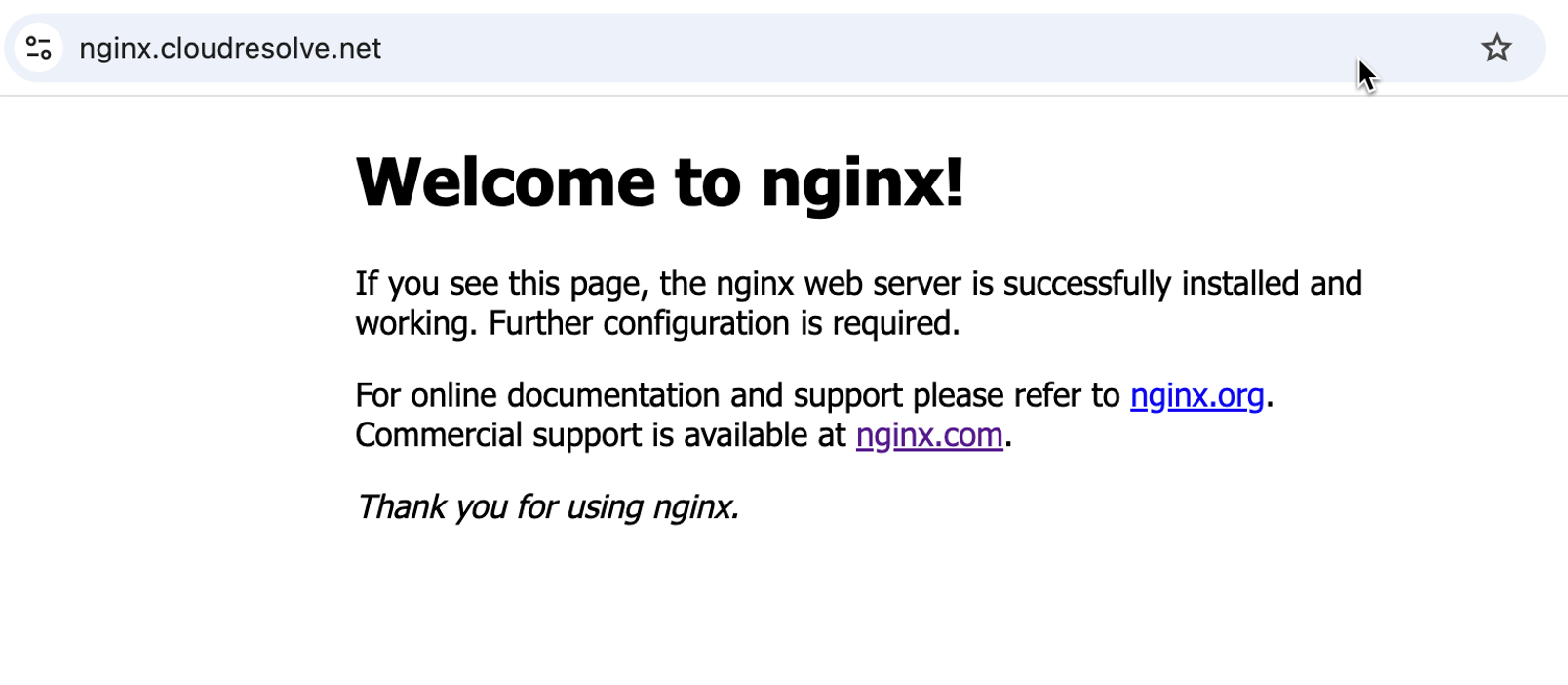
The following images show the working server in EKS
kubectl logs nginx-6c74d84d49-sxqmm    -n kube-system
10.0.1.251 - - [11/Mar/2025:05:49:22 +0000] "GET / HTTP/1.1" 200 612 "-" "kube-probe/1.31+" "-"
10.0.1.251 - - [11/Mar/2025:05:49:27 +0000] "GET / HTTP/1.1" 200 612 "-" "kube-probe/1.31+" "-"
10.0.1.251 - - [11/Mar/2025:05:49:27 +0000] "GET / HTTP/1.1" 200 612 "-" "kube-probe/1.31+" "-"
Conclusion
We have successfully deployed the Nginx web server helm chart on Elastic Kubernetes Services EKS Cluster. This application is mapped the custom domain name nginx.cloudresolve.net with external-dns automatically updating the route53 DNS records. This application is being exposed through AWS ALB which terminates SSL connections using the specified certificate and routes incoming requests to the appropriate backend service.